Yananyaa Conference: Browser-Based Video Meetings
2026-09-18 · By Haileyesus Ingidu
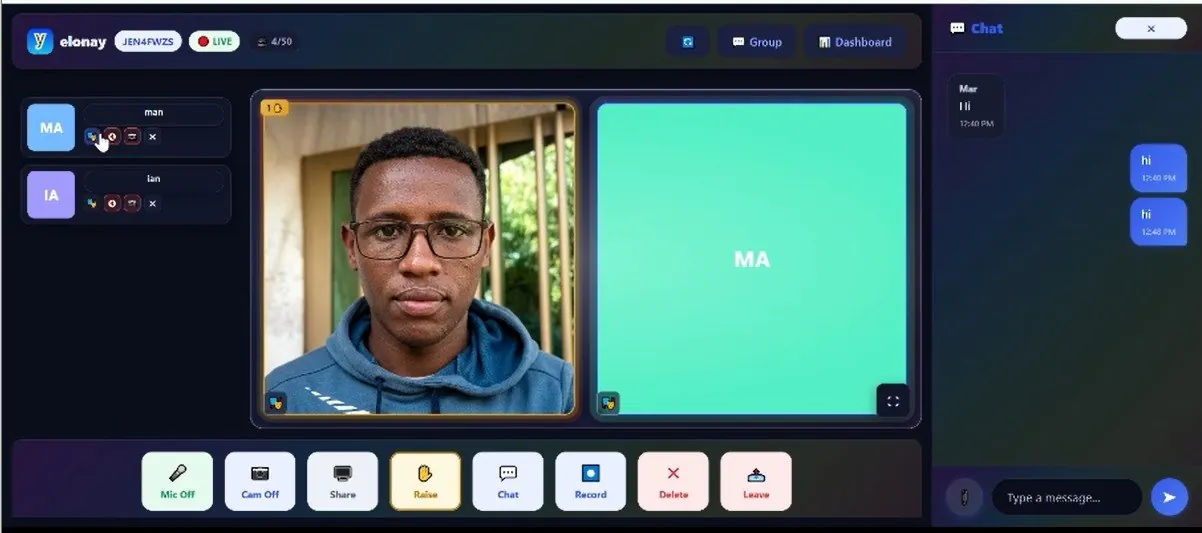
Video meetings should not require a long download, a complicated account setup or a screen full of buttons nobody understands. Yananyaa Conference is a web-based meeting platform built around simplicity: open the page, enter a room code and you are in. This article covers the main features, who they are best suited to, and some practical tips for running a smooth meeting.
What is Yananyaa Conference?
Yananyaa Conference is a video meeting tool that runs entirely in the web browser. Participants can join instantly without downloading, installing or updating a desktop application. That makes it convenient for guests, students and clients who only need to attend one session.
The Virtual Stage
Most meeting apps show everyone in an identical grid. Yananyaa Conference adds a dedicated Virtual Stage, which lets the host bring selected participants into focus. This works well for panel discussions, webinars, training sessions and presentations, where the audience should be looking at the speakers rather than at everyone at once.
Join with a short room code
Joining is as simple as typing a short room code, such as a combination of letters and numbers, into the page. There are no long meeting links to copy, no complicated passwords and no need for guests to create an account first. You can read the code aloud over the phone or paste it into a message.
A clean interface with clear buttons
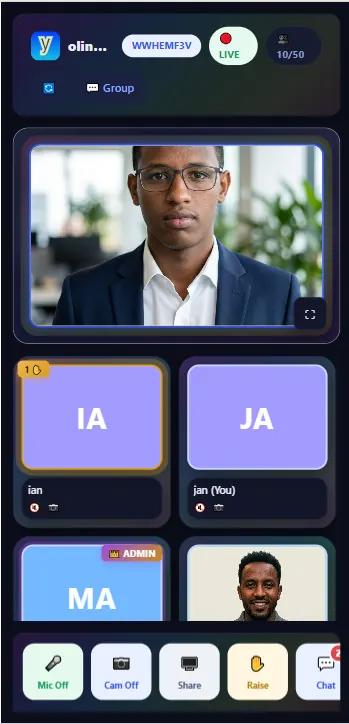
The layout is deliberately minimal. Large, clearly labelled buttons at the bottom of the screen handle the essentials: Mic, Cam, Share and Raise. Beginners can find what they need without hunting through menus.
- Dashboard button: sits at the top of the meeting space so that you can move between the live room and your account settings or schedules.
- Group button: also at the top, to connect your meeting with your wider team or community.
- Record button: a single click on the main control bar starts recording, with no sub-menus to open.
Chat and file sharing
The chat panel is docked at the side of the screen so you can type without interrupting the video. A paperclip icon lets you attach and send files quickly, which is handy for sharing slides, worksheets or agendas while the meeting is running.
Host controls and room size
Hosts have visible management tools on the main toolbar, including a Delete button for removing disruptive participants, so moderation does not require searching through settings. The platform is also designed for small and medium groups. The room we reviewed showed a limit of 50 participants, which favours stable, manageable meetings over stretching bandwidth across thousands of passive viewers. Check the current limit before you plan a large event.
Who is it for?
- Teachers and trainers running online classes and workshops.
- Small businesses holding client calls and team catch-ups.
- Community organisers hosting webinars and panel discussions.
- Individuals who want a quick call with no software to install.
Tips for a better online meeting
- Test your microphone and camera a few minutes before the session starts.
- Use headphones to prevent echo, and mute yourself when you are not speaking.
- Face a window or lamp so your face is well lit.
- Share the room code and the agenda in advance.
- If you press Record, tell participants first. It is good practice and, in many places, a legal requirement to get consent.
- Use the Raise button for questions so that people do not talk over each other.
Frequently asked questions
Do participants need to install anything?
No. The meeting runs in the browser.
Do guests need an account?
No. Guests join with a room code.
Can I record the session?
Yes. There is a Record button on the main control bar.
Can I share files during the meeting?
Yes. Use the attachment icon in the chat panel.
Conclusion
Yananyaa Conference keeps online meetings simple: no downloads, short room codes, a clear control bar and a Virtual Stage for presentations. If you need a straightforward way to meet, try Yananyaa Conference for your next session.
Ready to try Conference?
Yananyaa Conference: browser-based video meetings and virtual classrooms. No app install required.
Open Conference now → (opens in a new tab)